
Review management for service businesses
You do the work.We ask for the review.
Automatic review requests after payments or appointments. Friendly follow-ups, handled for you.
One plan. $29/month per location.
$0 today · Card required · $29/month after your 14-day trial
Connect the software you already run the business on.
Every paid job or finished appointment sends the review request for you.

 FreshBooks
 ServiceM8
 Mindbody
 Gingr
Gingr
 Follow Up Boss
 Hostaway
 JobNimbus
 Make
Make
 Tripleseat
 Checkfront
 Shopmonkey



An example scorecard for Summit Plumbing: review grade B, #4 of 11 nearby plumbers. Your scorecard reads your real listing.
See how you stack up against nearby competitors.
Find your business and get a free review scorecard: your grade, how you rank against nearby businesses in your category, and what it takes to move up.
Public Google data only. Free, no signup.
A stronger reputation. A lighter workload.
From the first review request to the reply, put the follow-through on autopilot.
01Automatic requests
The work is done. The review request is already handled.
Connect your payment or booking app once. Customers get a friendly review request at the time you choose.
- Send by text or email after a payment or appointment
- Your timing. Your message. No manual sending.
- See which apps connect
From finished work to a friendly ask.
ExamplePayment received
James Okafor · 8:41 AM
Hi James! Thanks for choosing Summit Plumbing. Would you leave us a Google review? Your review helps others choose with confidence. https://reviewnudger.com/r/example Reply STOP to opt out.
Review request sent automatically
One less thing on your to-do list.
Everything above is included in the one $29-a-month plan — nothing here costs extra.
$0 today · card required · no charge until your 14-day trial ends · $29 a month per location after that
“Wes was very helpful in setting me up with his program. He was very professional and answered questions about setup quickly. A smaller company like his offers his customers direct communication with his staff. I am happy to be using this program.”
Watch a paid job turn into a Google review.
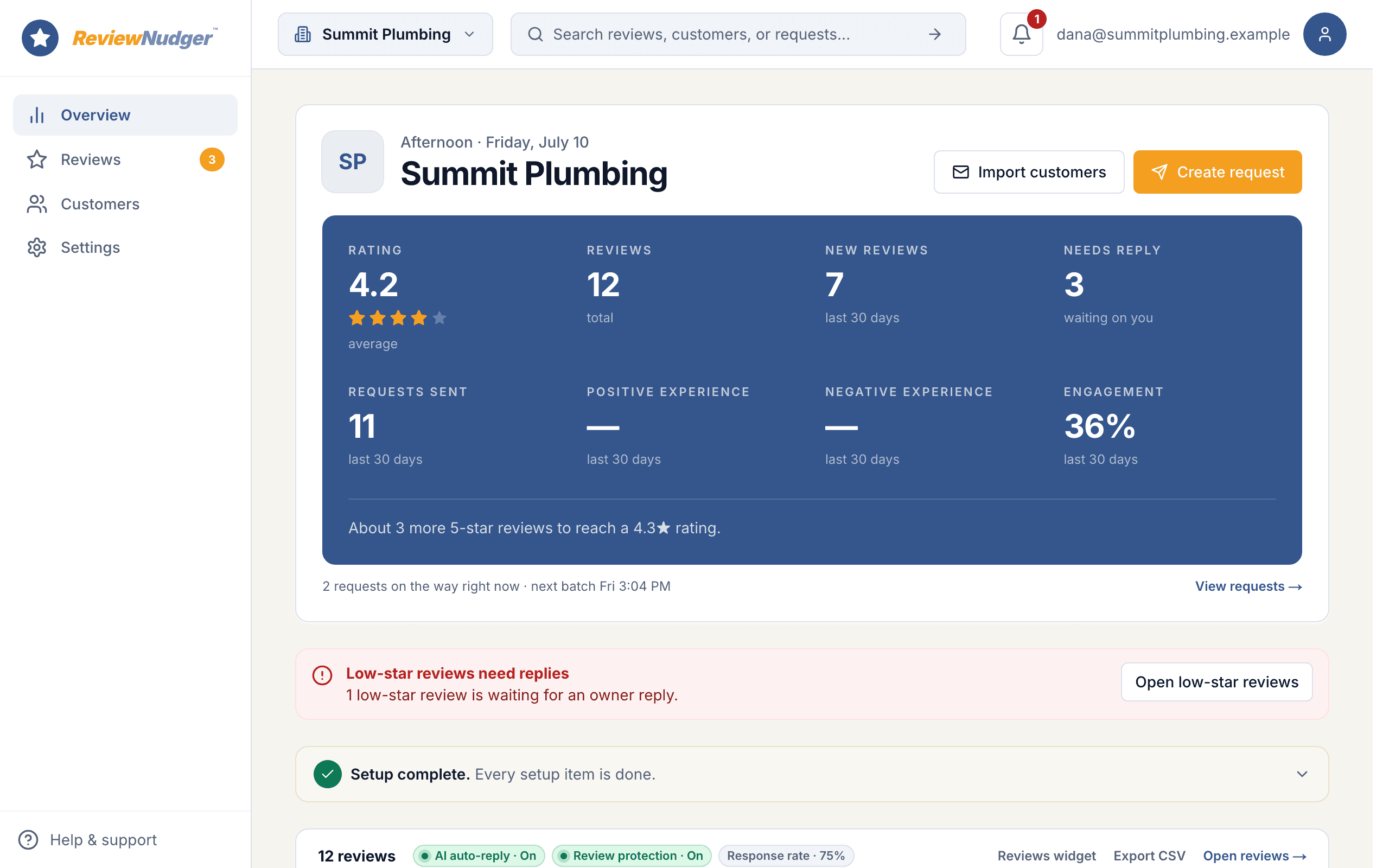
Follow one customer from payment to review. Then step inside the dashboard to see the follow-ups, replies, and everyday details that run in the background.
15 short steps · about two minutes · no signup · plays right here, or open it on its own page
 Summit Plumbing · example account
Built for businesses that run on reputation.
Whether you serve customers, care for patients, or work with clients, make asking for a review part of your everyday routine.
Home services
HVAC, plumbing, cleaning, landscaping, and more
ExploreHealth & beauty
Dentists, chiropractors, salons, and med spas
ExploreProfessional services
Legal, real estate, insurance, and property management
ExploreAutomotive
Auto repair shops, detailers, and more
ExploreShops & local businesses
Retail, pet care, venues, travel, and more
Explore



Send yourself the actual text.
We'll text you the exact review request your customers get after a paid job. It usually lands in about ten seconds.
No payment app? You can still ask today.
Connecting a payment app makes requests fully automatic, but nothing about ReviewNudger requires it — every account gets both of these from day one.
Type a name, hit send
Type a customer’s name and number and the request goes out right away, or at a time you pick. Your crew gets a private link and QR code so they can ask on the spot from their phones.
Upload your customer list
Upload a spreadsheet (CSV file) of past customers and send requests to all of them at once — the fastest first win, from people who already love your work.
Whichever way you send, the same protections apply automatically — unsubscribes, do-not-contact requests, wait periods between asks, and quiet hours.
The complete plan
Every feature. One simple price.
Per location · Unlimited team members
Start free trial$0 today. Card required. No charge until your trial ends.
Everything you need to stay on top of reviews
- Automatic text & email requests
- Follow-ups that stop when customers act
- Google review inbox & AI replies
- Review protection & customer feedback
- Your branding & website widgets
- Unlimited team members
Is ReviewNudger right for your business?
Built for US service businesses that want Google review requests without a broad communications suite. Check your payment or appointment integration, customer contact permissions, and texting readiness before turning on automatic requests.
What does the plan and trial include?
$29 per month per location, billed month-to-month.
Standard 14-day free trial with a card required. Cancel before the trial ends to avoid a charge.
The paid plan includes SMS and email review requests and follow-ups, with no monthly message cap or per-message fees. Sending rules, consent, and availability still apply.
Trial SMS includes up to 50 message attempts across the account, including initial requests, reminders, tests, and failed attempts. Failed attempts are not refunded; restarting a subscription or changing numbers does not reset the allowance.
A toll-free texting number and carrier verification are included. A local number is an optional $100/year add-on, billed separately; it requires a paid plan and its own approval.
When can I send text messages?
Your own toll-free number can send only after carrier approval. While verification is pending, or for up to 30 days after rejection while you correct it, accounts with an active plan and sending turned on may send from a ReviewNudger number when available and within daily limits. These texts use the standard message and end with "Sent via ReviewNudger". Accounts marked "blocked" cannot use this number. Sending switches to your own number once approved; email requests remain available when your sending rules allow them.
What can I automate and monitor?
Automatically request Google reviews after supported payments, appointments, or other documented completion events. Manual requests and CSV upload-and-send are also available; contact permission, cooldowns, and sending rules apply.
Google review monitoring and replies are included. Additional public review destinations can appear on the request page; they do not add monitoring or reply publishing for those sites. AI replies are optional. Review protection advises the owner, who reports through Google; removal is never guaranteed.

Start getting reviews from the customers you already have.
Set up in about 10 minutes. Requests go out after each paid job, follow-ups run on their own, and every review lands in one inbox.
$0 today · card required · no charge until your 14-day trial ends · $29 a month per location after that